musaik · for macOS · Windows coming soon

Rethink
Music Creation.

A new way to make music.

Available November 1, 2026

musaik splits finished songs into drums, bass, music and vocals, understands tempo, key, chords and song structure – and puts everything together so it fits. For mashups, track edits and DJ mixes. Always on beat. Always in key.

4 stems per song 3 modes in one app ≈ 400 built-in phrases 118 sounds in the musaik Synth 🎲 new sounds by chance A–H rekordbox hot cues in edit mode Offline work, no account DE / EN interface & help

Watch the film on YouTube

What makes musaik special

You don't need to know music theory. musaik does.

musaik is made for people who love music but aren't musicians – DJs, party people, content creators. The app helps you at every step: picking samples, playing in a melody, combining songs. Everything automatically lands in the right key and on the right beat. You don't have to worry about it – musaik brings it all together.

♪
Always in keyPick “Melody” or “Chords” in the harmonizer and every note you play lands on a pitch that fits the song. Samples show in green whether they fit and are transposed if needed. Phrases and arps take their notes from the song's chords.
⏱
Always on timemusaik measures every song's beat grid and brings all tracks to one tempo. Clips snap to bars, loops run in sync, recordings can be quantized.
⧉
musaik brings it all togetherOne click on “Arrange” and musaik distributes the drums, bass, music and vocals of your songs across the song structure – groove to groove, vocals where the vocals belong.
☺
Guided, not left aloneA guided tour for every mode, 21 help chapters, plain language instead of jargon – and you always see what will happen before it happens.
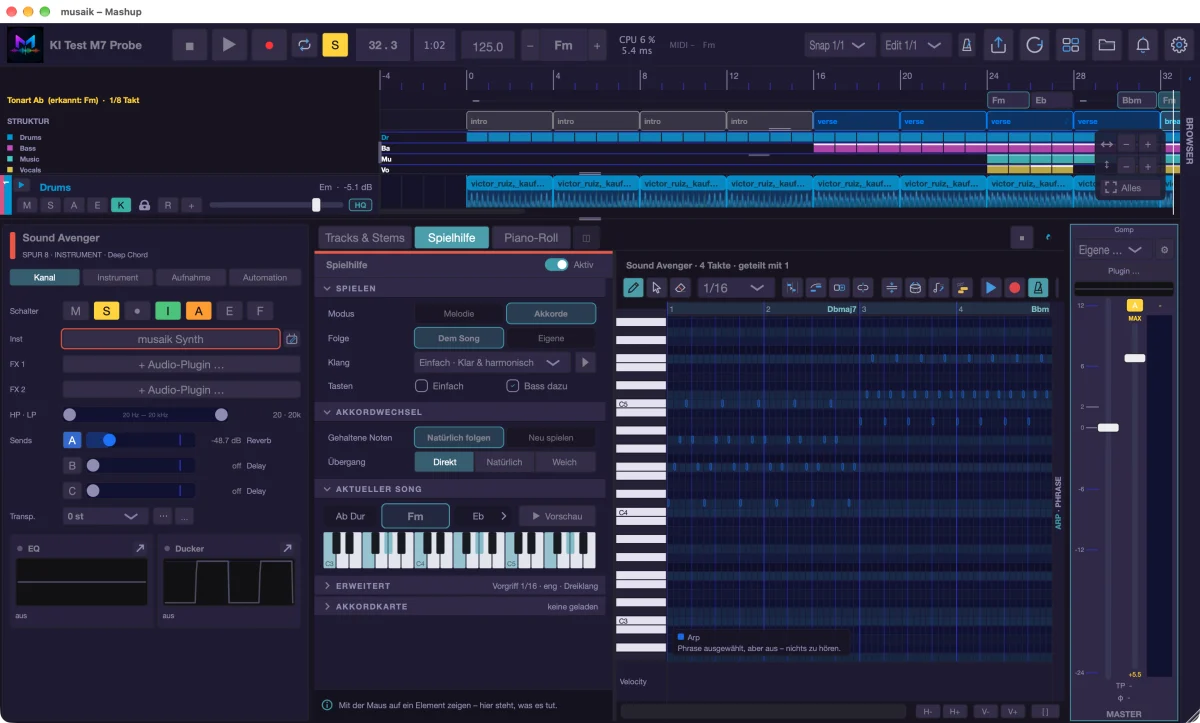
Play assistant as a column beside the piano roll: play a melody or chords, the keyboard shows what sounds
Three modes, one analysis

Mashup. Edit. DJ mix.

Mashup

Several songs become a new one.

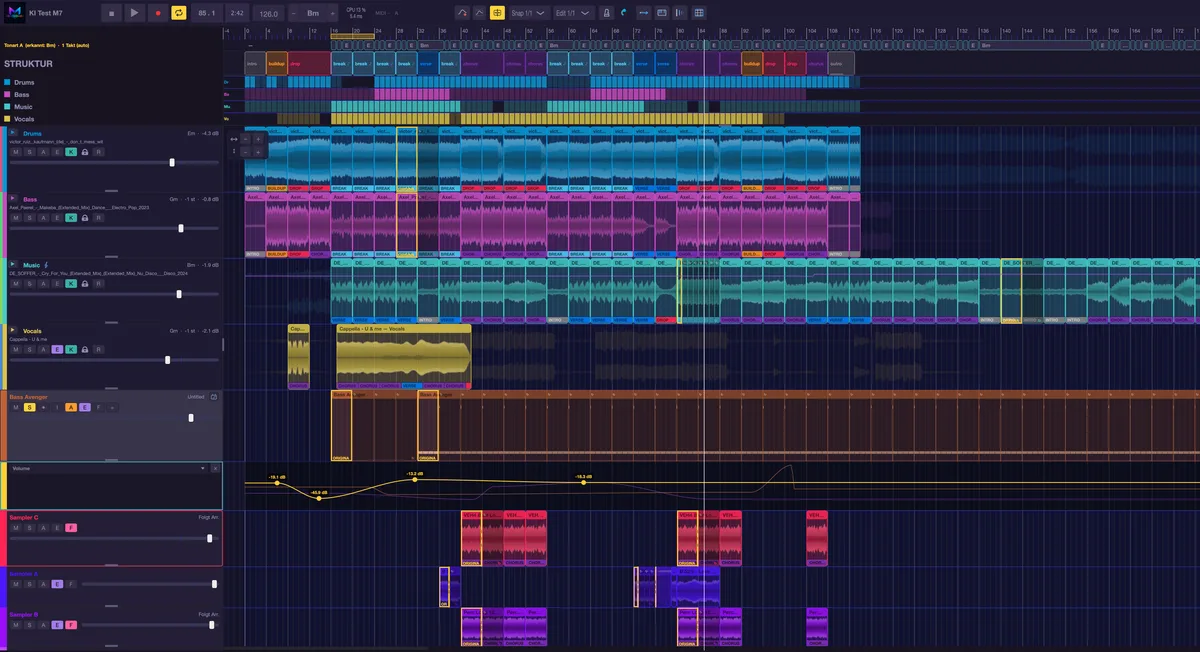
  • A structure master sets arrangement, grid, tempo and loudness; a harmony reference sets key and chords.
  • Four element tracks – drums, bass, music, vocals – each fed by one song. Swap the source with one click.
  • Arrange (Cmd+R) by song structure and your rule set; locked tracks stay exactly as you built them.
  • Up to 8 sampler and 8 instrument tracks, harmonizer, arps, phrases and AI suggestions.
See Mashup mode in the app tour →
Mashup mode
Edit

Rework a single song – in its original tempo.

  • Shorten, extend, swap parts, add a club intro – no time-stretch, no transposition.
  • BAR SELECT (1–128 bars) plus CLONE, COPY, PASTE, INSERT, DELETE, CLEAR.
  • AUTO edits: club intro/outro, tighten breaks, radio → club edit, single drop, halve the mix-in, hook/drop first, build-up drums → +bass → +music – or everything at once following your rule set.
  • Stem view: switch drums, bass, music or vocals on and off per range.
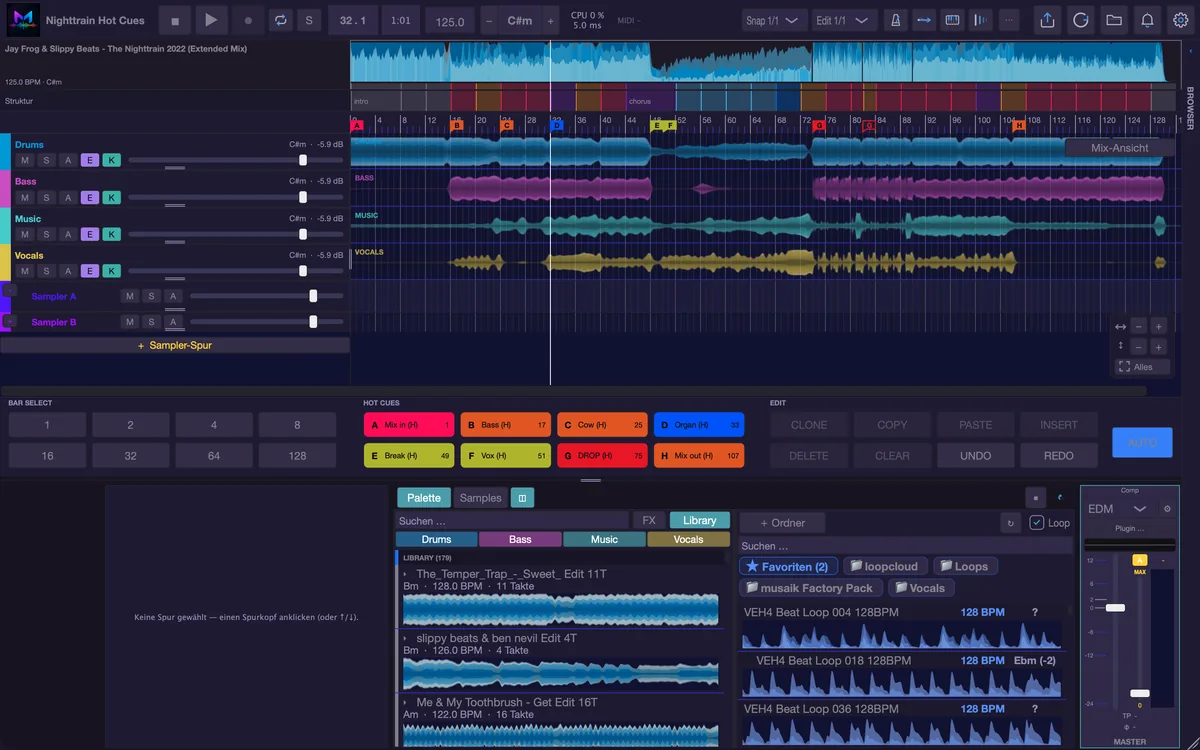
  • New: hot cues from rekordbox – as flags and pads, for jumping and reworking, and back to rekordbox on export.
See Edit mode in the app tour →
Edit mode with hot cues from rekordbox
DJ-Mix

A continuous set – with transitions down to the stem.

  • Magnetic chain on decks A and B: change one transition and everything after it follows.
  • Automix plans mix points and transitions; 11 transition and 8 stem presets.
  • Harmonize (Cmd+H) sorts by key and BPM, the relationship light rates every transition.
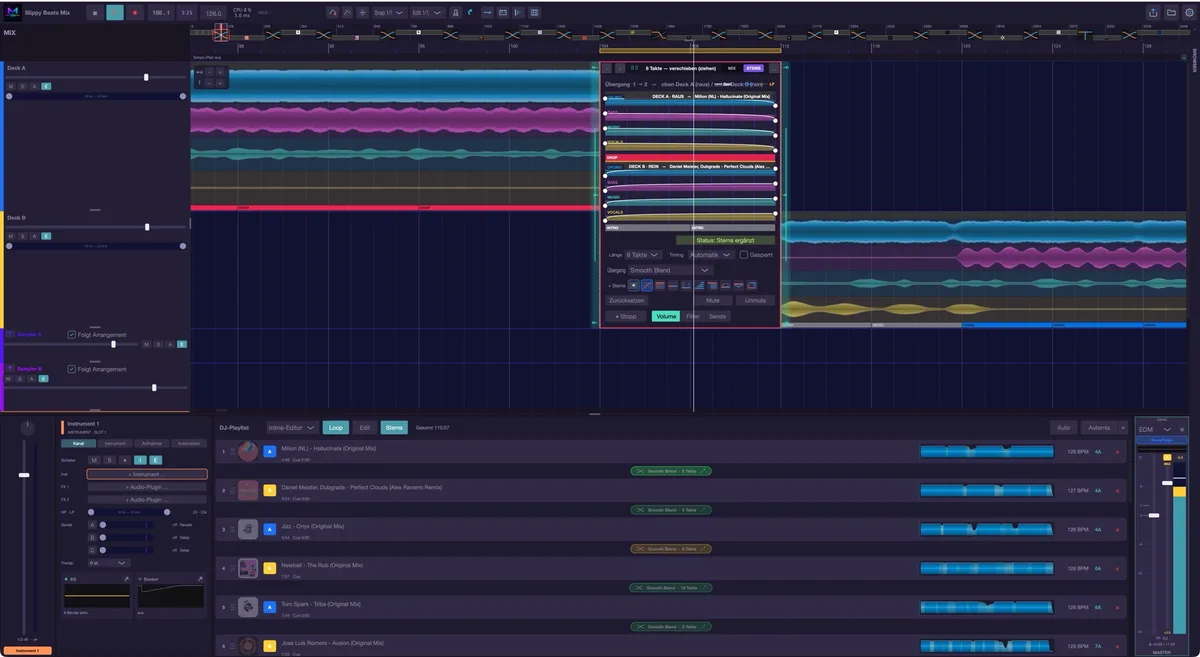
  • Inline editor, overlay and the small right-click editor – every curve can be reshaped by hand.
See DJ mix in the app tour →
DJ mix with inline transition editor
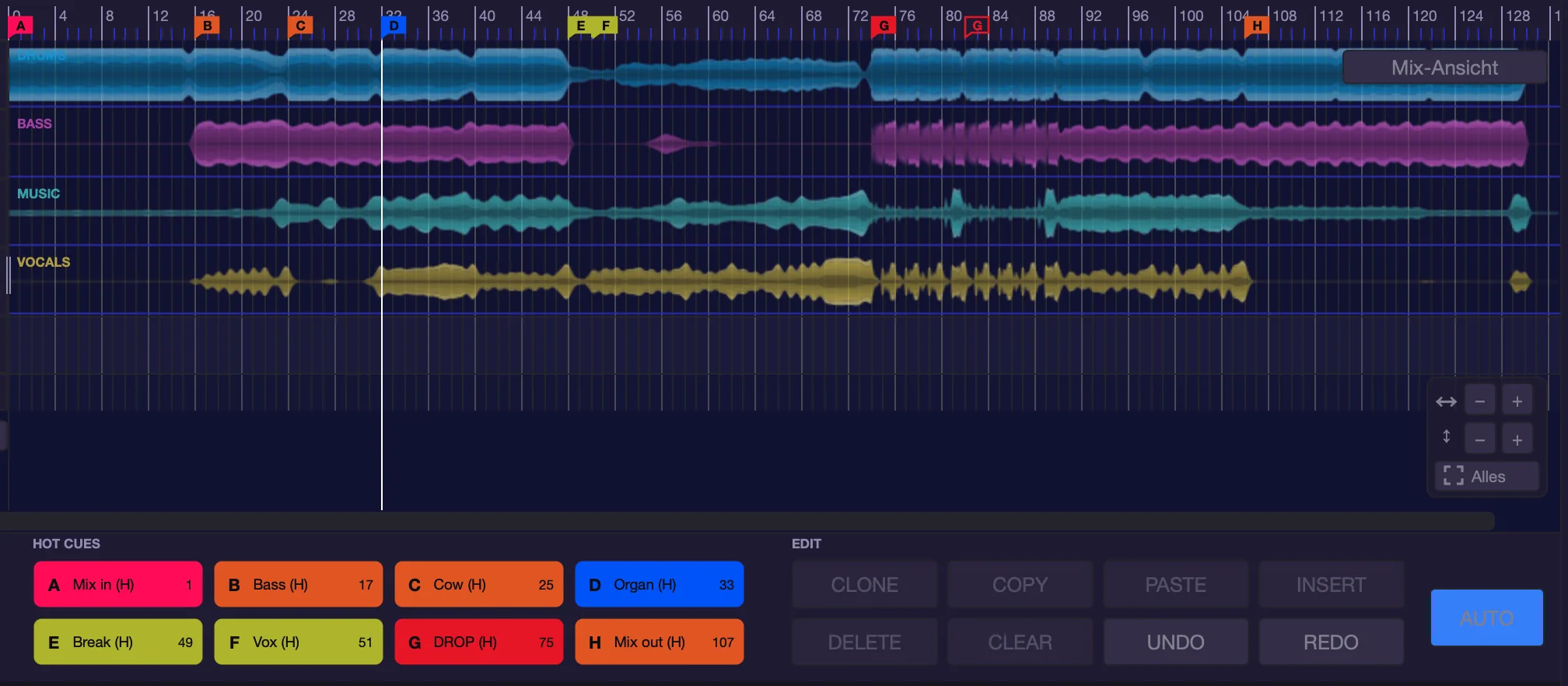
musaik edit mode: hot cue flags in the ruler and pads A to H
Eight hot cues from rekordbox: as flags in the ruler and as named pads. The drop was doubled – at the repeat, G is hollow.
New in edit mode: hot cues

Your rekordbox hot cues. Right in the edit.

Drag a track from your rekordbox collection into the edit and its hot cues come along – with names and colours. In the edit they are jump points and handles for reworking. And on export they go back to rekordbox, at the right spot in the new edit.

◆
Flags and padsThe cues appear as coloured flags in the ruler and as pads between BAR SELECT and EDIT. Hover over a flag and a line runs through all lanes.
8
Play them like on a playerKeys 1–8 jump to a cue or set it on the beat, Shift+1–8 deletes, X puts a cue into the next free slot. Change name, colour and slot with a right-click.
⇆
Rework with the cuesCmd+drag on a flag inserts the part up to the next cue somewhere else, Shift+Cmd+drag to the left cuts it out – bar-accurate, with a preview.
↻
They come alongCues stick to their spot in the song: cut, clone or move and they come along. Repeats appear hollow.
⬆
Back to rekordboxOn export musaik writes the cues along – as a new track, you re-link the original entry, playlists included, to the edit, or you replace the original audio file (with a backup). musaik takes tempo and beatgrid from rekordbox when the track has been analysed there.

Hot cues in the app tour → Tutorial: step by step →

Built in: musaik Synth

Your own synthesizer. Already on board.

118 factory sounds in nine categories, up to eight layers per sound – no plug-in, no installation, and in the export exactly as you hear them. Every sound knows its genre and its role: put a phrase on an empty instrument track and musaik suggests the matching sound right away.

118
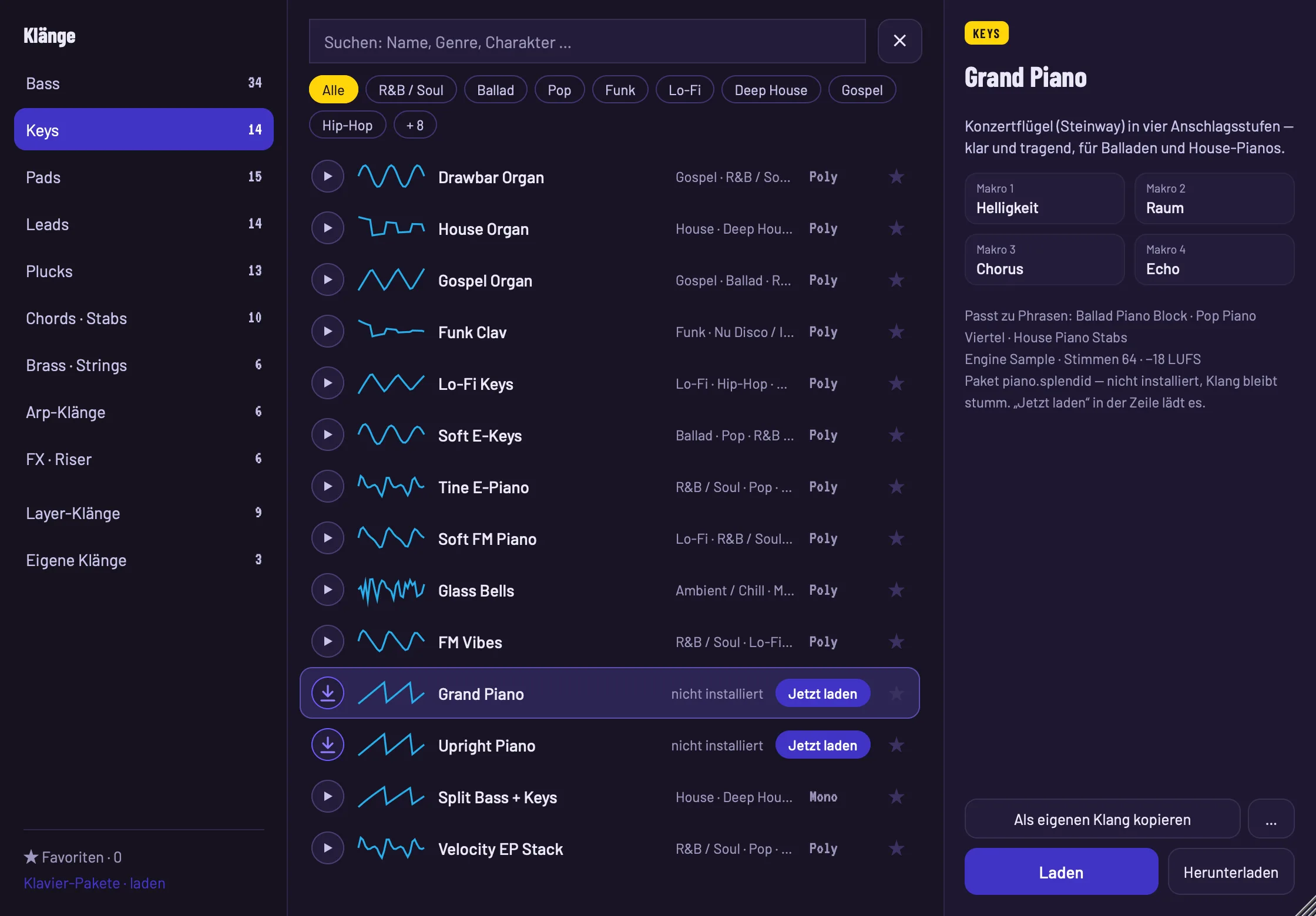
Sounds for every role34 basses, 14 keys, 15 pads, 14 leads, 13 plucks, 10 chords & stabs, 6 brass & strings, 6 arp sounds and 6 FX – matched to 42 genres and all levelled to the same loudness.
◐
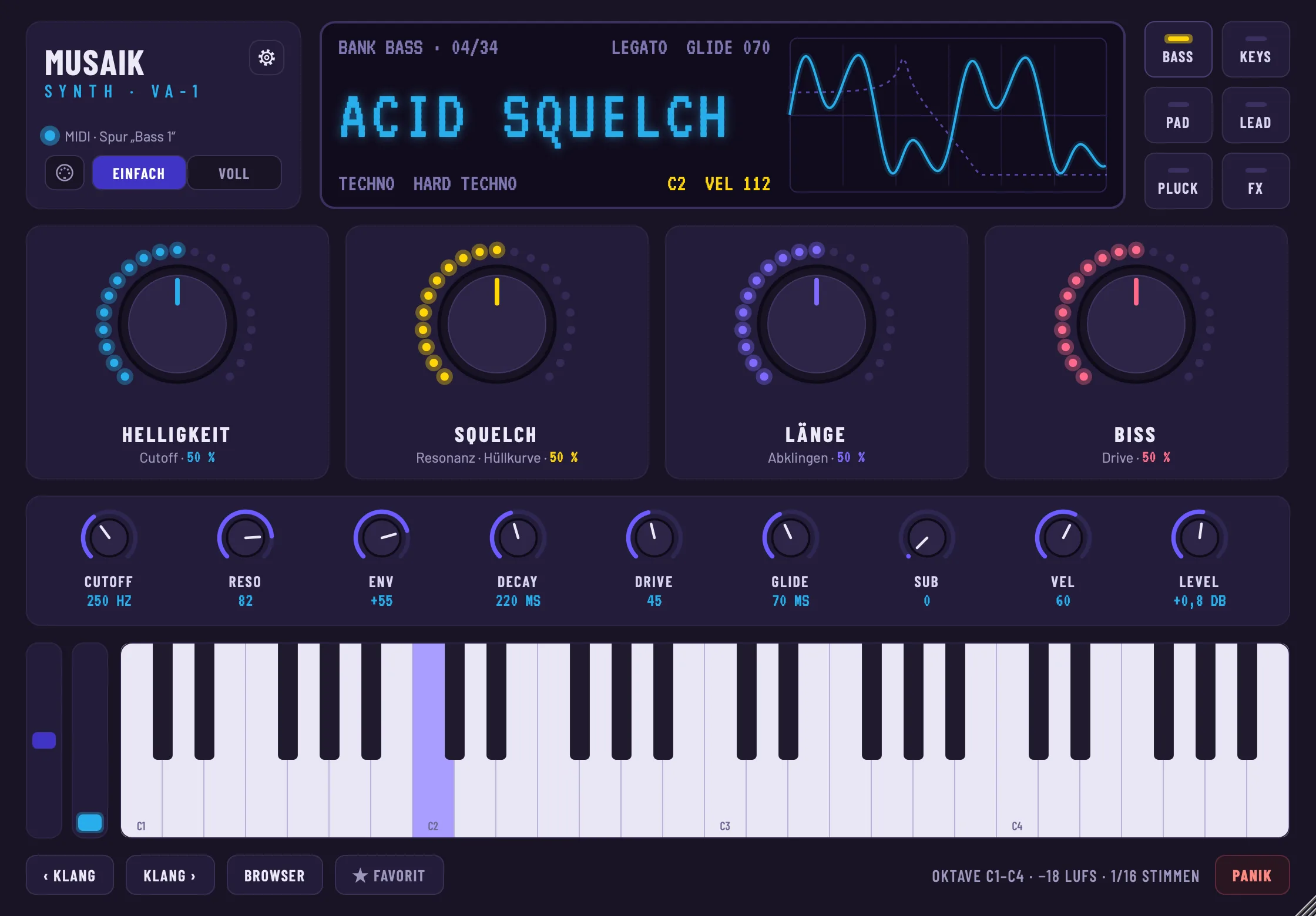
Simple or fullThe simple view shows four macros such as “Brightness”, “Bite” or “Length” – one turn and several controls move along. The full view shows everything: tab M for the whole sound, tabs 1–8 for the layers.
8
Up to eight layersEvery layer is a complete synthesizer: three oscillators with 14 wavetables, sync and FM, 18 filter types, four envelopes and two LFOs. Stack layers (bass + sub, pad + choir) or split them across key and velocity ranges – nine factory sounds are already built that way.
⇶
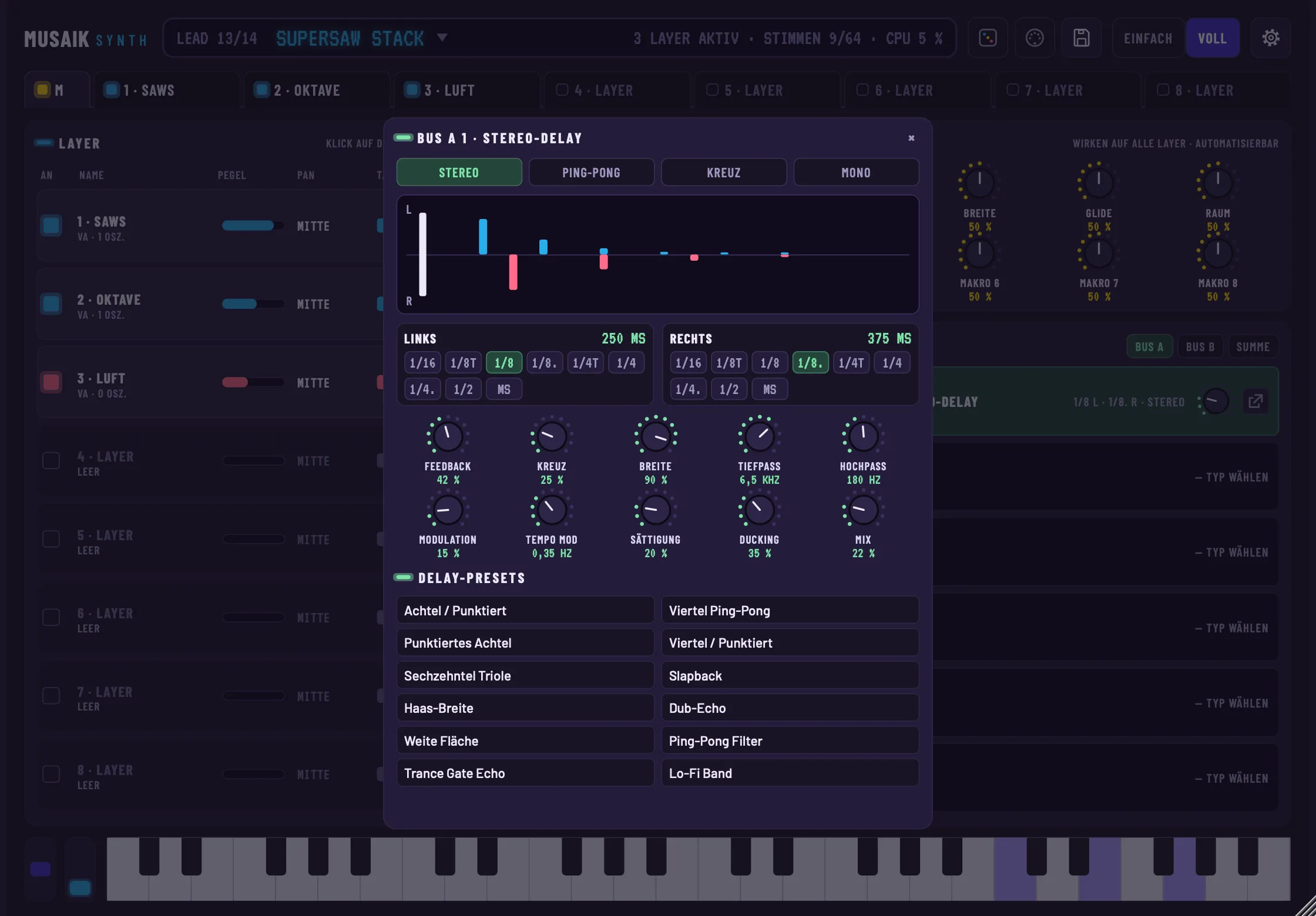
Effect chainsBus A, bus B and sum with six slots each, plus an insert per layer – 14 effect types, including a stereo delay with separate left and right times, ping-pong, ducking and twelve presets.
≋
Analogue, FM and real pianosAnalogue waves and wavetables for basses, leads and pads, FM e-pianos and bells – plus two real pianos with string resonance on the sustain pedal, downloaded once from within the app.
⎍
MIDI learn and settingsEvery control on your controller: click, move the controller, done – in the simple view too. The gear sets window size, voices, concert pitch and an economy mode for slower computers.
♪
Works with everythingHarmonizer, arps, phrases, AI ideas, automation and export work as with any instrument. The browser previews sounds by role and filters by your track's genre.

musaik Synth in the app tour →

musaik Synth, simple view
Simple view: sound, four macros, the key controls, keyboard.
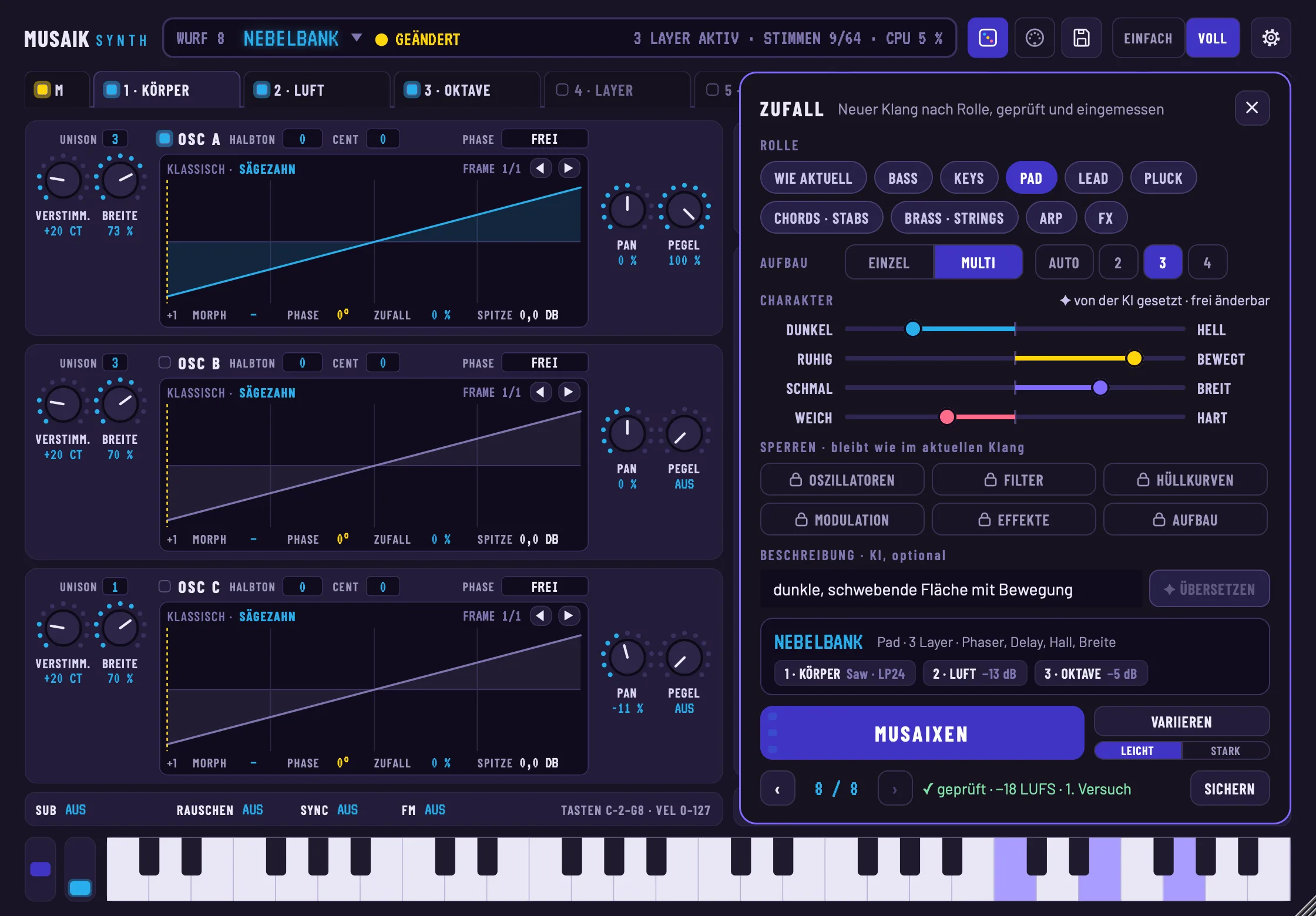
musaik Synth, RANDOM panel with MUSAIX
Random: role, structure, character, locks, description – and the result with layers and effects.
New in the synth: MUSAIX

One click. A new sound.

Need a bass, a pad or a lead that isn't in the list yet? Choose the role, set a direction with four sliders and press MUSAIX: musaik rolls oscillators, filter, envelopes, layers and effects into a sound of your own – and listens to it before you do.

◎
Role and characterNine roles from bass to FX. Dark ↔ bright, calm ↔ moving, narrow ↔ wide and soft ↔ hard set the direction – no numbers, no expertise. Lock what you already like.
4
Up to four layersLayered if you like: a sub under the bass, air above the pad, a bell above the keys – every layer with its own job and freely editable afterwards.
⇶
All 14 effectsReverb, delay, chorus, phaser, trancegate, filter sweep, distortion, compressor and more – up to four on the sum, plus their own buses and inserts for single layers.
✓
Listened to and levelledmusaik discards silent, clipping or unfitting rolls itself. What arrives is as loud as the factory sounds; the last 20 rolls stay in the history, SAVE turns one into your own sound.
✦
Describe it in wordsOptionally with AI: “dark, floating pad with movement” – the AI picks role, structure, character and effects, the rolling happens in the synth. Without AI it always works, offline too.

Random in the app tour →

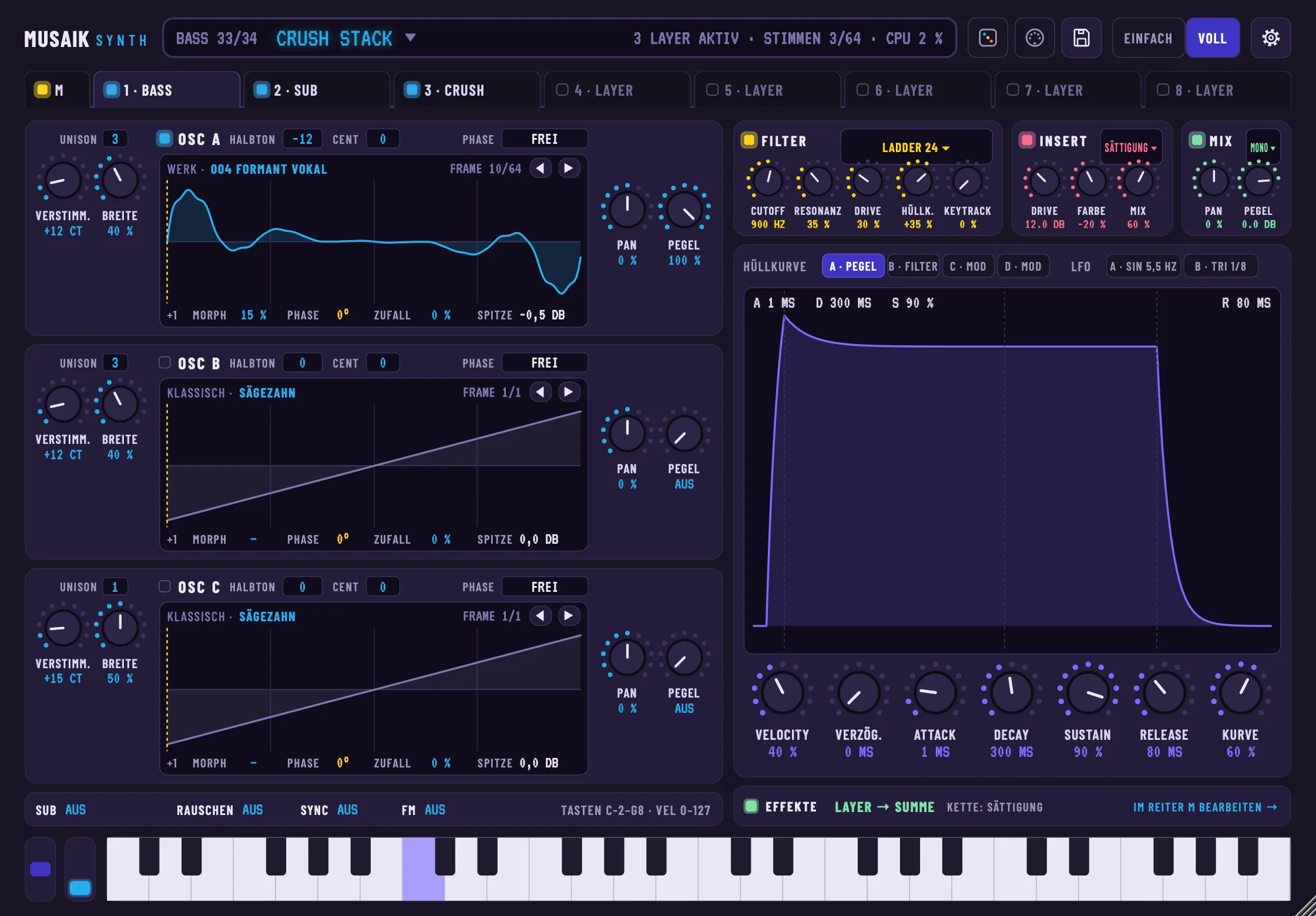
musaik Synth, layer page
Layer page: three oscillators with wavetables, filter, insert, envelopes and LFOs.
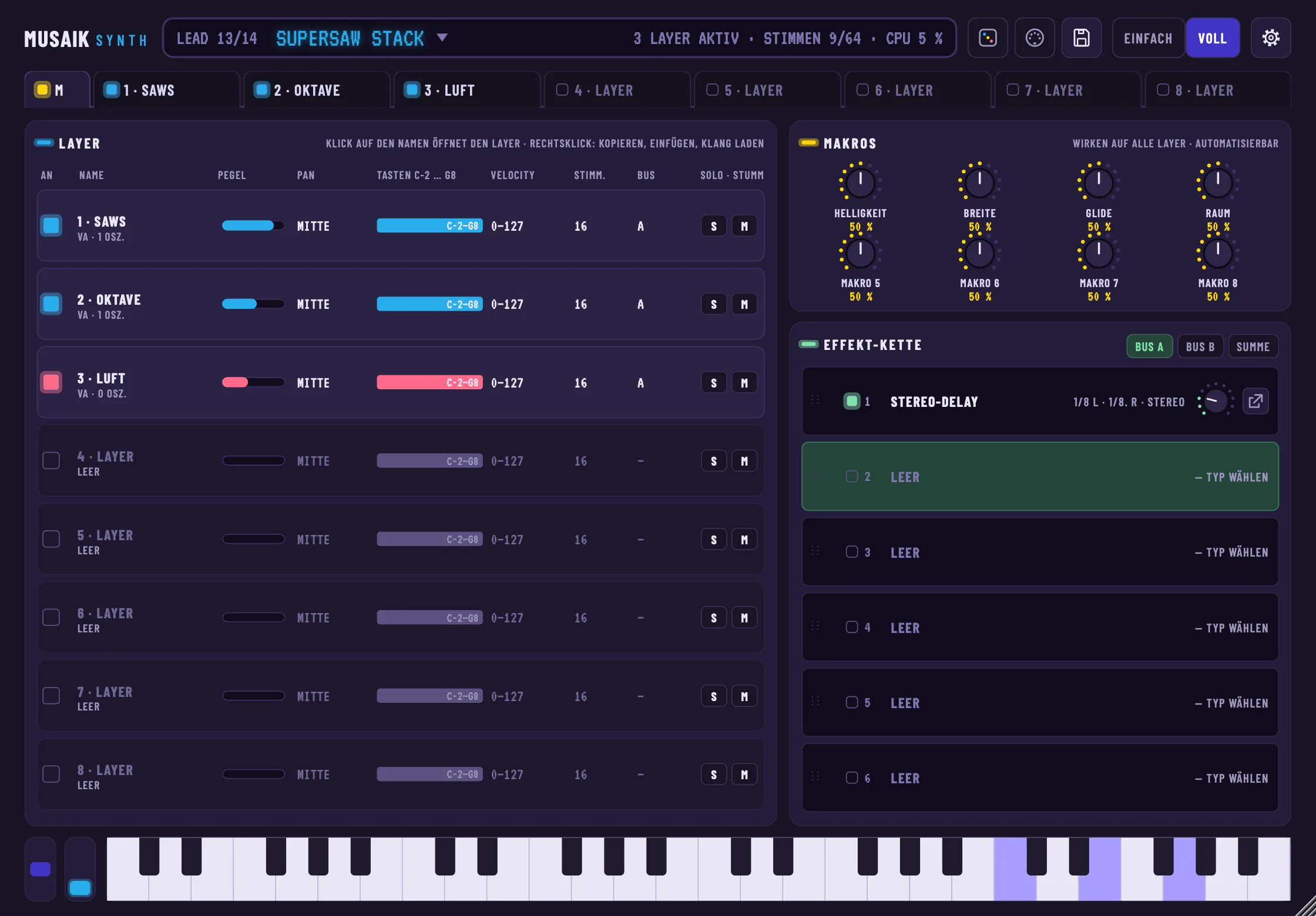
musaik Synth, tab M
Tab M: all layers with key and velocity range, eight macros, effect chain.
musaik Synth, stereo delay
Stereo delay: separate left and right times, filters in the feedback path, twelve presets.
musaik Synth, sound browser
Sound browser: categories, genres, search, preview and details.
Mix like a studio

EQ, master dynamics and ducker. All built in.

Three tools DJ software doesn't ship like this – without a single plug-in: EQ on every track, every bus and the master, a ducker in every channel, dynamics on the sum. And built so you can see what they do.

Built in: 8-band EQ

Shape your sound and see it.

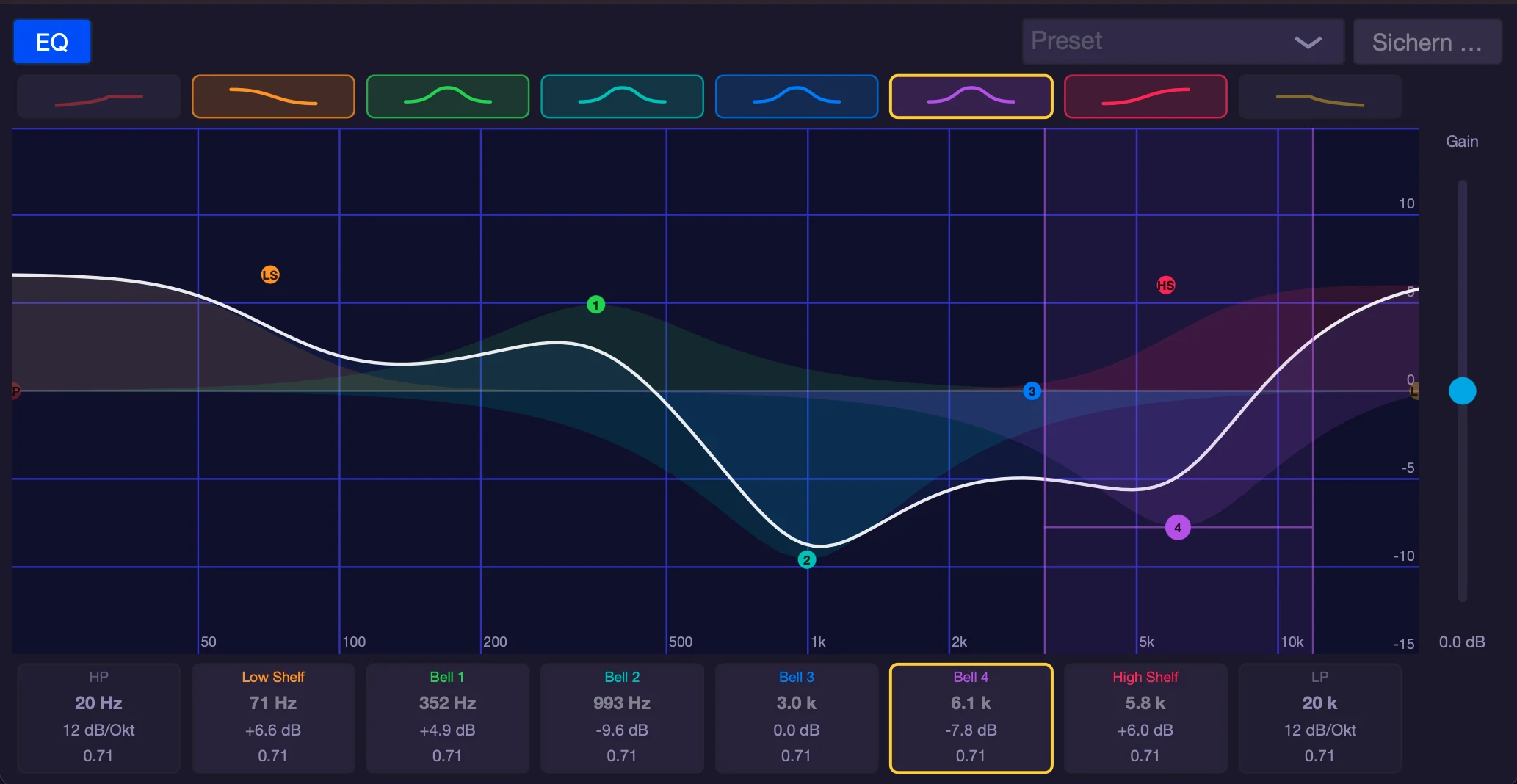
An equalizer modelled on Logic on every channel, every bus and the master: eight bands in their own colours, a large curve to drag and presets for a quick start.

8
Eight bands, eight coloursHigh-pass, low shelf, four bells, high shelf and low-pass. Each band switches on and off with one click, and its area shows what it does to the sound.
↕
Right in the curveDragging a handle changes frequency and gain, the edges change the width (Q) or corner frequency, the scroll wheel changes Q. Option+click resets a band.
#
Every value to type inBelow the curve you find frequency, gain and Q of every band: drag, or double-click and type – fine with Shift.
★
Presets and your own settingsFactory presets, your own via “Save …” and “Neutral (reset)”. The EQ opens in the channel column or as a large window.

EQ in the app tour →

musaik 8-band EQ with curve and values per band
EQ window: eight bands, curve with band areas, values per band.
musaik master dynamics with controls, meters and history
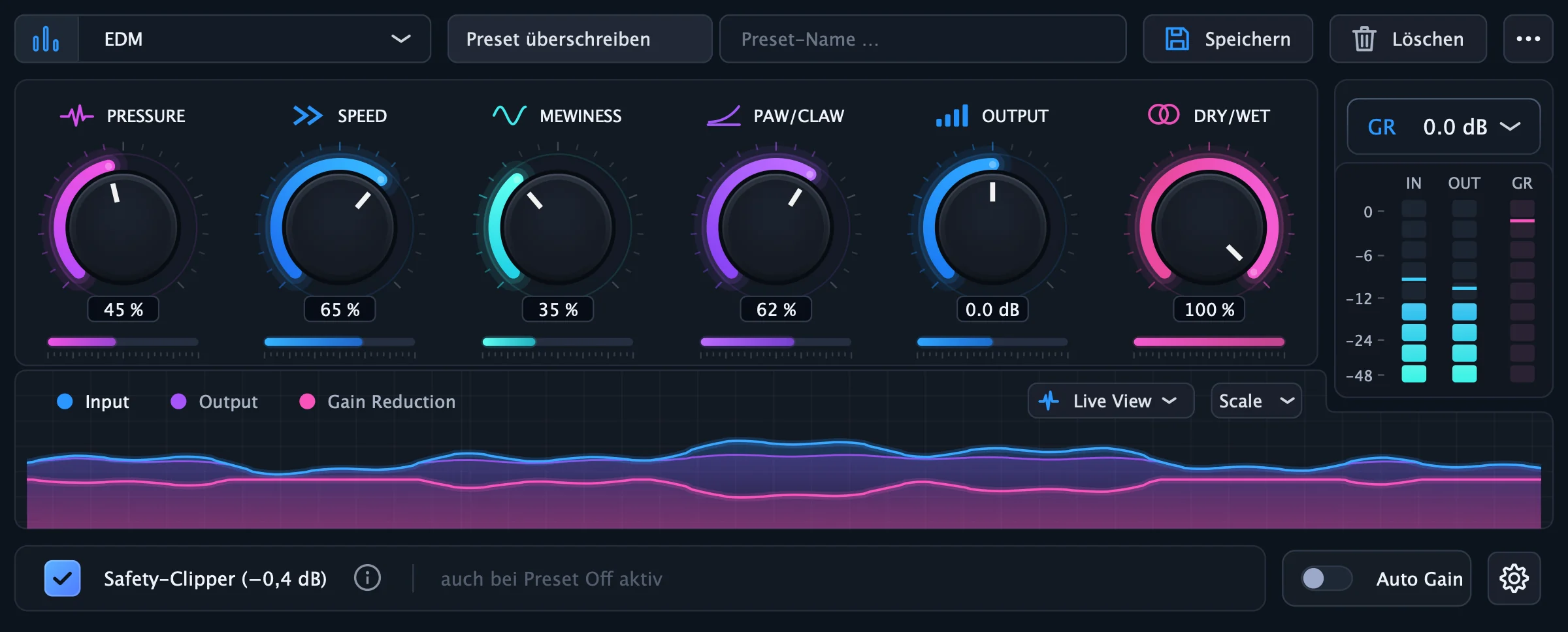
Master dynamics: six controls, meters, history and presets in one window.
Built in: master dynamics

A master compressor that shows what it does.

Your mix sounds denser, louder and rounder – no plug-in, no expertise needed. Pick a genre preset and musaik shapes the dynamics of the whole mix. If you want more, turn six controls and watch live what happens.

10
Presets for your genrePop, Hip-Hop, EDM, Techno, Rock, Acoustic, Glue, Pump, Festival and Chill – plus your own presets to save, overwrite and delete.
GR
See instead of guessMeters for input, output and gain reduction with peak hold, plus a history over 5, 10 or 30 seconds: you see exactly when and how hard the compressor works.
?
Explained in plain wordsOne click on “?” puts a short explanation over every control and meter – written for people who aren't sound engineers.
⛨
Safe all the way to the exportAuto Gain balances the level, maximizer and safety clipper keep peaks below 0 dBFS, true-peak and correlation meters measure the mix.

Master dynamics in the app tour →

Built in: a ducker on every channel

Make space where it counts.

When bass and kick fight or the music buries the vocals, the ducker lowers the track at exactly the right moment – the pumping effect of dance and house, without sidechain routing.

♩
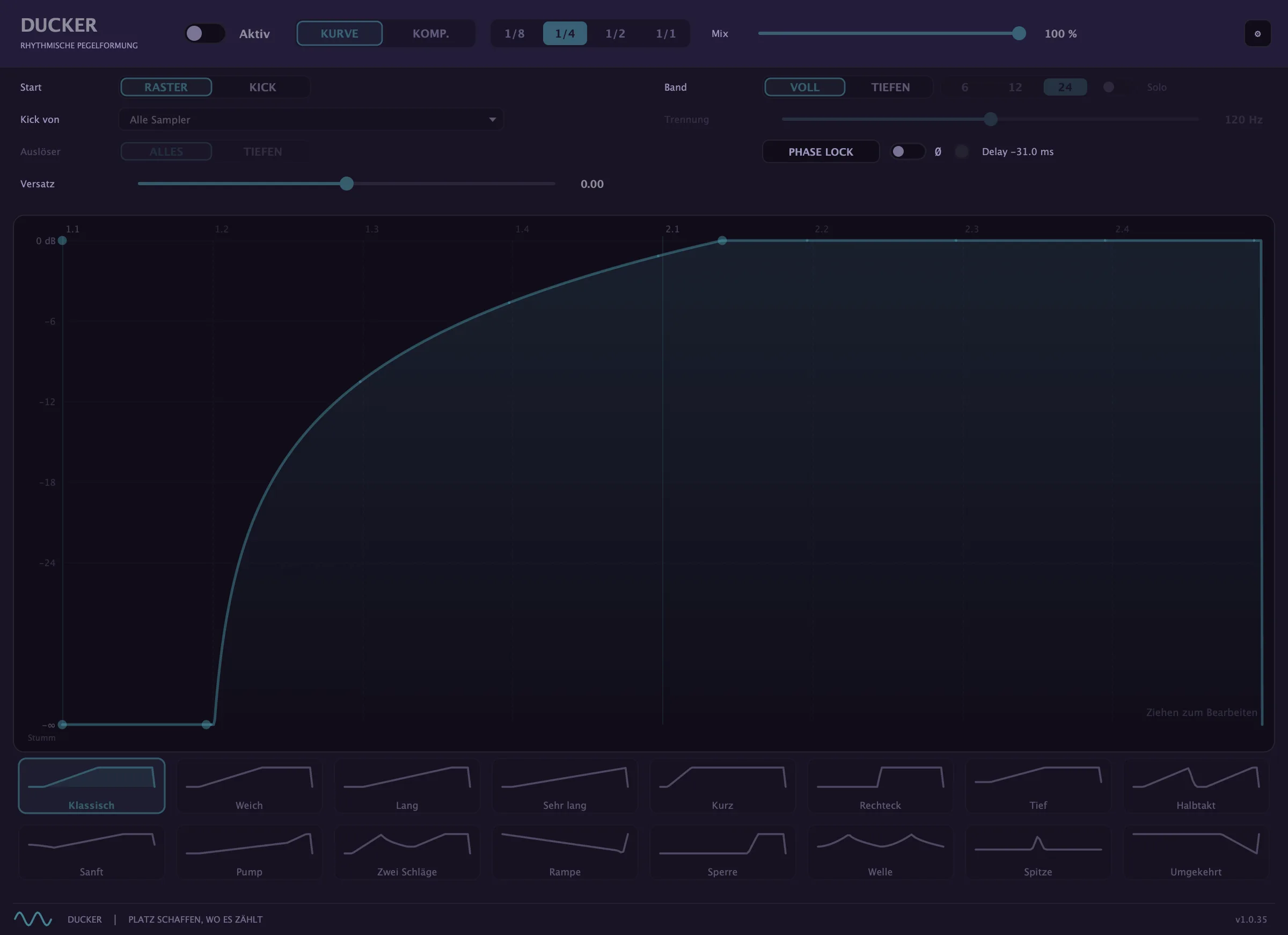
CURVE: from the grid or from the kickAn envelope from 1/8 to 1/1, 16 templates from “Klassisch” to “Umgekehrt”, freely drawable. Start GRID runs locked to the beat, start KICK restarts the curve on every kick of the kick lane.
≈
You see your materialBehind the curve sits the track's signal, folded onto the beat. So you put the dip exactly where it's needed.
⇄
Kick from any title, lows onlyThe kick comes from all drums, the drums of one particular title or the samplers. If you like, the ducker only lowers the bass, Phase Lock aligns kick and bass – and COMP. is the classic sidechain with depth, attack and release.
⬇
Audible right into the exportThe ducker sits in every mixer channel, can move along when you swap the track’s source, and sounds in the export exactly as it does on playback.

Ducker in the app tour →

musaik ducker in CURVE mode with start GRID and the Klassisch template
Ducker in CURVE mode: on the left what starts the curve (start, kick from, trigger on, offset), on the right band and phase lock, below the curve and 16 templates.
How it works

From song folder to finished file in six steps

Create a project“+ Mashup”, “+ Edit” or “+ DJ Mix”.
Add songsDrag from folders or straight from rekordbox, Serato and Apple Music.
Let it analyseGrid, key, chords, structure, stems – automatically.
Put it togetherArrange, rework or let musaik plan the transitions.
MixingLevels, EQ, effects, ducker, master – all built in.
ExportWAV or MP3 – straight into rekordbox if you like.
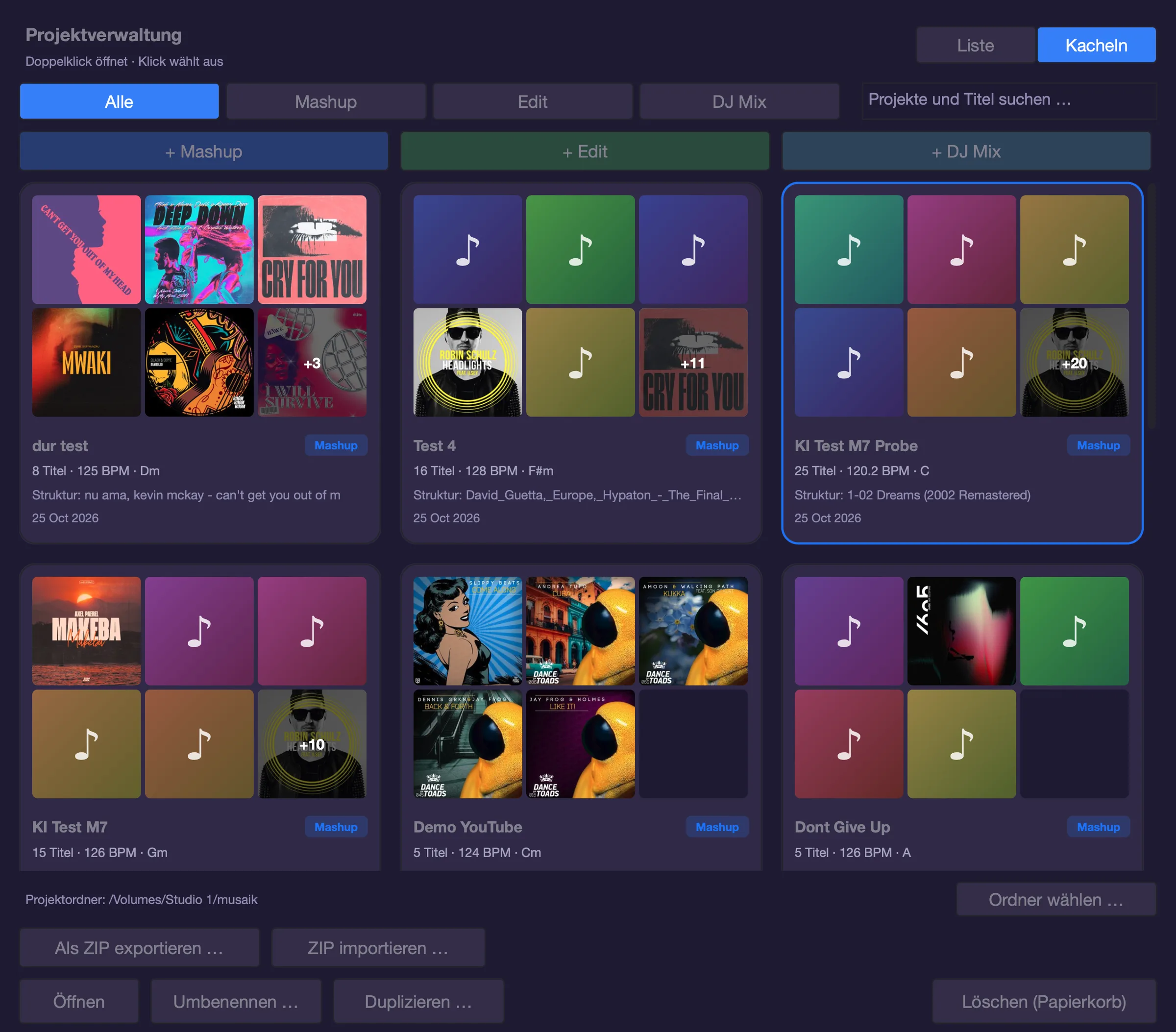
musaik project manager as tiles: up to six mini covers per project, tempo, key and structure master
Tile view: every project shows the covers of its titles – with more than six titles the last field shows “+N”.
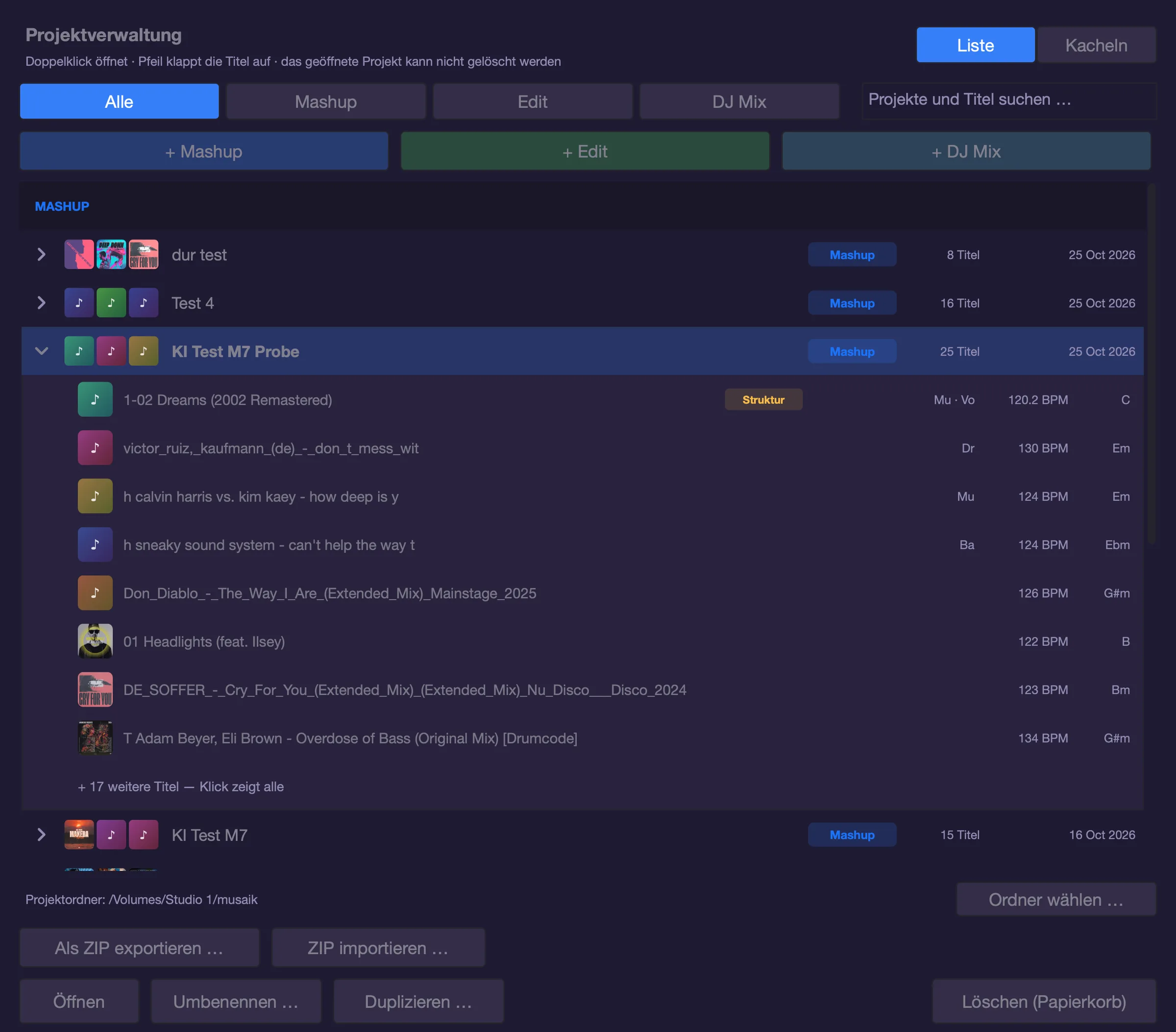
musaik project manager as a list: a mashup folded out with structure master, roles, BPM and key per title
List view: a mashup folded out – the structure master on top, then the titles supplying drums, bass or music.
New in the project manager

Your projects. At a glance.

Which songs are in which mashup, which one sets the structure, and in what order does the mix run? The project manager shows you without opening a project.

▾
Fold outMashup and DJ mix projects fold out: every title with cover, roles (drums, bass, music, vocals), BPM and key. In a DJ mix numbered in playlist order.
▦
Or as tilesOne card per project with up to six mini covers, tempo and key, the structure master – for a DJ mix with approximate length and number of transitions.
⌕
Search down to the titlesThe search finds projects by their name and by the songs inside them.
⇪
Everything in one placeCreate, open, rename, duplicate, share as a ZIP and choose the project folder.

Project manager in the app tour → See the tiles →

Everything included

Features at a glance

◎

Analysis

Tempo, beat grid, key, loudness, sections (intro, verse, chorus, drop …) and vocals – on your computer, with Apple's music analysis from macOS 27.

⫶

Stem separation

Drums, bass, music and vocals per song. Seconds on Apple Silicon, fast or best quality.

♫

Chord bar

The chords of every bar, shown above the arrangement – as name, degree or Camelot. Each field correctable with a click.

✋

Harmonizer & Chord Follow

Play a melody or chords instead of music theory – the play assistant sits right next to the piano roll and shows on a keyboard what sounds. No more wrong notes.

⟿

Arps & phrases

16 genre arp presets and about 400 phrases in 56 genres that take their notes from the song – so they fit any song. Turn any MIDI clip into your own phrase and swap phrases as standard MIDI.

✦

AI ideas (optional)

Melody, arp or phrase from one sentence – three variants, always on beat and in key. Offline with Apple's model (macOS 26 or later) or a local model, otherwise with your own cloud access.

🎹

musaik Synth & instruments

Built-in synthesizer with 118 sounds and up to eight layers – basses, keys, pads, leads and two real pianos – matched to the genre and role of every phrase. Plus your AU/VST3 instruments, up to 8 tracks, piano roll and MIDI recording.

▦

Sampler & palette

Up to 8 sampler tracks, your own snippets in the palette, a sample library with key hints and tempo-synced preview.

⚖

Rule set

Your taste as rules in plain sentences – for mashup, DJ mix, structure and edit. Mashup, DJ mix and edit rules can be drafted by AI from a sentence.

🎚

Mixer & master

8-band EQ and ducker per channel, three FX buses, master dynamics with presets, maximizer, true peak and safety clipper. Automation on every track – including the parameters of insert plug-ins. Up to two Mackie controllers (such as an X-Touch with extender): faders, coloured displays, meters and automation via touch and latch.

⇄

rekordbox & Serato bridge

Your collection, playlists and crates right inside musaik – read-only. On the Mac also the library of the Music app (formerly iTunes). Send the result back into your rekordbox collection if you like, in edit mode with hot cues.

⬇

Export

WAV or MP3 (up to 320 kbps, via LAME on the Mac), 44.1–96 kHz, faster than real time, exactly as you hear it – plugins included.

+1

Inserted bars

An extra bar in the song? musaik detects inserted and missing bars, shows them in the phrase bar and puts the sections after them back in place. Press E to set them yourself.

✎

Segment correction & community

Sections detected wrong? Fix them with Cmd+K. musaik recognises the song by its sound later. If you like, you share your corrections and get everyone else's – no music, no titles, no names. If you have analysed phrases in rekordbox, musaik learns from them too.

≈

Studio-grade stretch

With “Highest”, musaik re-renders vocals or all elements with the Rubber Band Library – in the background while you keep working and listening.

⇆

Swap while playing

Swap drums, bass, the structure master or the harmony reference while the music plays. The new source comes in right where you are. Make the vocals the harmony reference and the singing stays in its key while everything else follows.

▤

Stem matrix & stem groups

The stem matrix shows bar by bar where drums, bass, music and vocals play – one click takes an element out or brings it back. In stem groups you hear what every song offers at that spot and drag it straight into the arrangement.

∿

Echo Out

Part endings and cuts fade out on the beat instead of stopping dead – adjustable level, length and repeat, per track or per clip.

✓

Check the arrangement

Cmd+Shift+P checks your arrangement: intro too short, drop without a build-up, two vocals at once, bass against bass. Many fixes take one click – no AI and no network needed.

⎘

Render, MIDI & import

Render instrument tracks to audio, save clips as MIDI files for your DAW. Import your own phrases from MIDI folders or as a pack, save clips as phrases, load Ripchord chord maps.

⇪

Projects, sync & downloads

The project manager folds out the titles of every mashup and DJ mix – or shows all projects as tiles with covers. Share projects as a ZIP, with or without audio. Via MMC musaik starts and stops together with your DAW. Free sample packs and five demo tracks download right inside the app.
Explore every feature in the interactive app tour →

Your music stays with you

100 % local. No upload, no account.

Analysis, stem separation and chord detection run entirely on your Mac. AI is optional – and even then only measurements are sent, never audio, never titles or file names.

0uploads of your music
0accounts
3devices per license
Comparison

What musaik does that others don't

A live tool and a studio tool serve different moments – the table shows fit, not ranking.

musaikDJ.Studiorekordbox 7Serato Studiodjay ProAbleton Live
Mashup mode with master structure and element tracks●–––––
Automatic arrangement by song structure + rule set●–––––
Timeline DJ mix with automatic transitions●●–◐◐–
Stem-level transitions with editable curves●◐–––◐
Single-track edit in original tempo and key●◐●◐–●
On-device stem separation●●●●●–
VST/AU instrument tracks with piano roll and MIDI●––◐–●
Own synthesizer with factory sounds●––––●
Parametric 8-band EQ with curve per channel, bus and master●––––●
Master compressor with genre presets and gain-reduction history●◐–––●
Tempo-synced ducker per channel with curve templates●––––◐
Sidechain ducking from an audio trigger (e.g. bass makes way for the kick)●––●–●
Chord detection for the whole track, shown per bar●–––––
Harmonizer – guided playing without wrong notes●––––◐
AI-generated melodies, arps and phrases in key●–––––
Song structure detection●◐●–––
Harmonic sorting by key and BPM●●◐–◐–
Works offline, no account needed●––––●
Reads rekordbox and Serato libraries●●◐●●–
Export straight into the rekordbox collection●–●–––
Live performance––●–●●

● built in · ◐ partial / via add-on or workaround · – not available. Based on public product pages and reviews, October 2026 (dj.studio, help.dj.studio, rekordbox.com, support.serato.com, audionewsroom.net, thedjmixtape.com, Algoriddim, Ableton). All trademarks belong to their respective owners.

Pricing

Buy once. Use forever.

No subscriptions. Every license is valid forever for all 1.x versions. Each mode stands on its own – get exactly the one you need, add others later or get everything right away.

Sales start on November 1, 2026.

Introductory price until 31 December 2026 – after that it is €99 per mode and €199 for Ultimate.

Within four weeks of your purchase you can upgrade to Ultimate, as long as you own exactly one mode: what you paid is credited in full. From the second mode bought separately this is no longer possible – the third mode then costs full price. If you want all three modes, Ultimate is cheaper from the start.

Mashup mode

Standalone: one new piece from several songs
79 €
  • Mashup mode with structure master & harmony reference
  • Analysis & stem separation (4 stems)
  • Automatic arranging + mashup rule set
  • Chord bar, harmonizer, arps, ≈ 400 phrases
  • Up to 8 instrument tracks with piano roll: musaik Synth (118 sounds) or AU/VST3
  • Up to 8 sampler tracks, palette, sample library
  • AI ideas (optional) & arrangement check
  • Mixer, EQ, ducker, 3 FX buses, master
  • rekordbox/Serato bridge & WAV/MP3 export
Buy

Edit mode

Standalone: rework one song
79 €
  • Rework one song – in original tempo and key
  • Minimap, large waveform, structure band
  • BAR SELECT 1–128 bars
  • CLONE · COPY · PASTE · INSERT · DELETE · CLEAR
  • AUTO edits: club intro/outro, tighten breaks, radio → club edit, single drop, halve the mix-in, hook/drop first, build-up
  • rekordbox hot cues, exported back with cues
  • Sampler tracks, palette, sample library
  • Edit rule set for automatic edits
  • Stem view: switch stems per range
  • Grid tool & grid warning
  • Analysis, stem separation & WAV/MP3 export
Buy

DJ mix mode

Standalone: blend songs into a DJ mix
79 €
  • Magnetic chain on decks A and B
  • Automix with 8 sections & DJ mix rule set
  • 11 transition and 8 stem presets
  • Inline editor, overlay and small right-click editor
  • Harmonize by key & BPM, relationship light
  • Mix tempo, sync ramps and tempo plan
  • DJ edit inside the tracks
  • Analysis & stem separation (4 stems)
  • Export of the entire mix
Buy

Ultimate

All three modes – €88 less than separately
149 €
  • Mashup mode
  • Edit mode
  • DJ mix mode
  • All rule sets: mashup, structure, edit, DJ mix
  • All future 1.x versions
Buy Ultimate
Try for freeTry all three modes for 14 days, with five stem separations. Only export is locked. After that musaik is locked without a license – your projects are kept and are back right away once you activate a license.
License & devicesKey by e-mail right after purchase. Up to 3 devices per key, no account. Several modes combine – just activate all keys.
Secure paymentProcessed by FastSpring as merchant of record right here on musaik.info. 14-day right of withdrawal. Prices incl. VAT.
FAQ

Frequently asked questions

Do I need to be a musician?

No. That's exactly what musaik is built for: the app detects key, chords and grid itself, and the harmonizer makes even “wrong” keys sound right.

Which systems are supported?

macOS 14 or later on Apple Silicon. You get the best results with macOS 27: musaik uses technologies that Apple only introduced with macOS 27, including on-device music analysis. On older versions musaik uses its own built-in models. The Windows version is already in beta testing and will be available soon.

Are my songs uploaded?

No. Analysis, stems and chords are created on your computer. AI is off by default; if you use it, only measurements (tempo, key, chords, sections) and your instruction are sent – never audio, never titles or file names. With Apple's or a local model nothing leaves your computer, as long as you don't add a cloud access. If you choose to share your structure corrections, only numbers are sent, never music.

Does musaik work with rekordbox and Serato?

Yes. The bridge reads your rekordbox collection and Serato crates (read-only). Finished results can be added straight to your rekordbox collection on export – the master.db is backed up automatically first. In edit mode musaik takes over the hot cues of a rekordbox track and writes them back at the right spot on export. On the Mac the bridge also reads the Apple Music library (formerly iTunes). Close rekordbox before exporting; for variable-bitrate MP3 musaik writes no cues.

Can I start with one mode and add more later?

Yes. Each mode works on its own – you don't need any other mode for it. You can buy more modes at any time; the keys combine in the app. If you want everything, Ultimate saves you €88.

Do I need my own instruments or plug-ins?

No. musaik comes with the musaik Synth: 118 factory sounds – basses, keys, pads, leads, plucks and more – each matched to the genres of the phrase library. You download the two pianos (about 600 MB together) once from within the app. You can also use your AU and VST3 instruments.

Do I need an internet connection?

Not for working. Once when the trial starts, when you activate your key and about 20 days after purchase to confirm the license – that happens silently in the background as soon as you are online. After that musaik keeps working without internet. Pianos and sample packs are a one-time download. You can free device slots yourself at any time.

Mathias Fiedler
About me

Mathias Fiedler

aka Slippy Beats / DJ MAUI

Music has always been my passion. Technology somehow too. And sometimes the best ideas come up exactly when the two meet.

I am a DJ, music producer, sound designer and mix engineer. And for a while now I have been getting deeper into software development again. But more on that later.

Read the whole story →

Give musaik a try.

Try every feature for 14 days, with five stem separations and without export. After that, a license keeps you going.

Download for macOS

Official launch: November 1, 2026

macOS 14+ (best results on macOS 27) · Apple Silicon · Windows coming soon · version 1.0.39 · Help